Wow. Check out the features Adobe has added to After Effects!

Showing posts with label after effects. Show all posts
Showing posts with label after effects. Show all posts
Wednesday, June 20, 2012

Wednesday, June 6, 2012
AE Tuts+ 'Create Custom Blood Spatter With CC Mr Mercury'
James Whiffin posted this tutorial on AE Tuts+ for using After Effects' built-in "CC Mr. Mercury" effect to create (in his words) "300-inspired blood spatter." Here's the preview, and the full tutorial can be found here.
Thursday, May 31, 2012
AE Tuts+: 'The Naked Truth About Rotations '
In this tutorial, Bartek Skorupa discuss at length the differences between "Orientation" and "Rotation," the issues of "Gimbal Lock," and how to work around some of the limitations of rotating layers in After Effects. A but dry, but essential stuff nonetheless!
Wednesday, April 11, 2012
Tutorial: Kinect MoCap Animation in After Effects

"Today I’m going to show you how to use your Kinect to animate a digital puppet... in After Effects. Once you’re up and running, you’re going to be using a Processing app called KinectToPin, written by the very talented animator Nick Fox-Gieg. That’s where you actually capture the tracking data, as well as where you convert it to keyframe information After Effects can understand."Here's Part 1 of the 4-part tutorial. Check out the rest over on ToolFarm.com or on VictoriaNeice.com.
Sunday, March 18, 2012
New After Effects Compositing Course from Jeff Foster and video2brain

In this workshop Jeff Foster — video producer, compositor, visual effects artist, and author of “The Green Screen Handbook” — teaches you the basics of green screen compositing and setting up a streamlined roto workflow with After Effects and a Wacom tablet.
You’ll get real-world tips on getting the best mattes and keys from your green screen shots, stabilizing and tracking footage in After Effects, and using the Roto Brush feature to create quick and accurate mattes of anything that moves in the frame. You’ll also learn how to create more believable composites by matching your foreground and background plates, using roto-spline masks, and applying match-moving techniques.
Here are some free video tutorials from the series:
Best Practices in Software Keying
Stabilizing with the Warp Stabilizer in After Effects 5.5
Roto Brush Basics
Wednesday, November 30, 2011
Prolost: ' Pimp Your After Effects'

After Effects is a professional tool by any measure, but it is designed for a broad user base. So an artist who plans to push it hard will want to tune the application accordingly.Read it, bookmark it, and start pimpin' out your After Effects today!
Friday, February 25, 2011
Using Stills to Create Matte Painting Effects in Your Footage
Here's a cool technique, using the still-photography function of your HDSLR to gather more information and more latitude than the HD video function alone can capture. This "tutorial" is a little dry, but stick with it. This technique opens up LOTS of possibilities!
How to use stills to create simple matte painting effects for your DSLR footage from Robino Films on Vimeo.
Thursday, February 10, 2011
Innovation: The Ice Book
Here's an amazing piece of film/theatre we first spotted over on Philip Bloom's excellent blog.
The Ice Book (HD) from Davy and Kristin McGuire on Vimeo.
"All we had was a 5D Mark ii, an old Macbook with After Effects, some builders lights and a green cloth that we improvised as a makeshift green-screen. Before we started we had no idea how to make pop-up books let alone how we could combine them with projections."
Sunday, February 6, 2011
FALLOUT Trailer now online!
Thursday, July 22, 2010
New Short “Extraordinary Colleagues” Premieres Friday at Phoenix Art Museum

The film will screen twice, once during the 6pm show and again during the 8pm show. The “Beat the Clock” Awards will follow at 10pm. More details can be found on IFP/Phoenix’s website. Tickets for the screenings are $15 each.
“Extraordinary Colleagues” was a co-production between the UATDV crew and Locked Horns Productions. Students Nick Wassenberg, Justin Gagen, and Mitch Faherty handled visual effects with some assistance from alumni Kalki Khaira and Ryan Whitten. Alum Ryan Luibrand handled editing duties. Students Kenny Rayl, Shawn Geary, Erica Faccone, and Kari McBride handled physical production, lead by DP Justin Gagen and directed by Professor DeNigris.
"Extraordinary Colleagues" mark's UATDV's first production using our brand new Canon 5D Mark II DSLR. Visual effects were executed in Adobe After Effects, with the comic book panels processed in Photoshop. Editing was completed in Avid Media Composer, with sound mixing and sweetening done in ProTools.
Thursday, June 3, 2010
Tutorial: Animating a Still

In this tutorial inject life into a still image by creating a 3d-looking camera movement and animate the movement of the smoke. We will also add realistic camera jitter and simulate a rack focus with dirt on the lens.Watch it on the Video Copilot website.
Saturday, April 3, 2010
Tutorial: Exporting 3d Camera Data from Maya into After Effects
 Jostein Finnekasa over at CG Tuts+ has produced a great brief tutorial on how to transfer camera keyframes from Maya into Adobe After Effects. This is a great technique for seamlessly integrating 3D animation and 2D compositing techniques in a shot.
Check it out here!
Friday, March 5, 2010
The Master of Color Correction
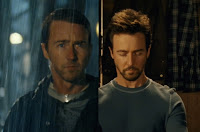 As a regular follower of Stu Maschwitz's ProLost blog (you may remember Stu as the author of our DVA101 textbook The DV Rebel's Guide), I've noticed that Stu seems a tad obsessed with color correction. And if you've seen my feature The Falls you know it's a subject of some fascination for me as well.
Stu's most recent color correction post "Memory Colors" got me looking back through some of his earlier posts on the subject and it looks like this exploration of the how the human brain processes color is an extension of his earlier examinations of how Hollywood's blockbuster film all seem to be utilizing a color correction scheme that places great emphasis on skin tones.
From October 2007 - "Hue are you?" looks at the fact that all human skin tones, regardless of ethnicity, fall onto the same axis of teh vectorscope and therefore are a lot more homogeneous than we realize.
From March 2008 - "Save Our Skins" takes that a step further and looks at the Hollywood color correction trend of keeping people "porange" (pinkish-orange), regardless of the overall "look" of the film.
From June 2009 - "Got Me a Side Job" talks about Stu's gig working with Red Giant software on their Magic Bullet product line. But most importantly, in the included video tutorial Stu walks us through how to recreate the looks of several Hollywood blockbusters using said software. But even without Stu's fancy plugins, his logic and methodology can be adapted for use with whatever color correction filters you have on hand. Worth a watch!
And now from February 2010 - "Memory Colors" further explores the topic and how human memory affects our perception of not just skin tones, but everything from cabs to coffee beans.
One of the coolest tips I've picked up from Stu - this free tool from Adobe called "Kuler" which can be used to very quickly develop a color scheme for your designs, artwork, color correction, whatever. Be sure to bookmark it!
Wednesday, November 11, 2009
Tutorial: Create an Ethereal Morphing Letter Canvas
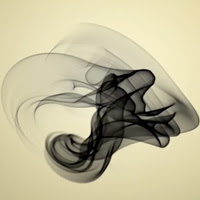 This cool tutorial comes from AE Tuts+, and shows you how to use After Effects' built-in "radio waves" effect to morph letters into swirling and chaotic shapes. An elegant and unorthodox use of an often-overlooked effect!
Check it out here.
Wednesday, November 4, 2009
Tutorial: Particle Explosion
 Here's a great tutorial from Video Copilot - "Particle Explosion." Andrew Kramer uses CC Particle World to build a complex particle system and then synchronizes the particle blast to shatter a title.
Check it out here!
Saturday, October 17, 2009
Tutorial: Create a Terminator-Style HUD with Expressions

Thursday, October 8, 2009
Featured Project: Viva La Vida
This week's featured project is Ryan Loveland's awesome effects-laden music video for Coldplay's "Viva La Vida," produced for last semester's DFVA254 Motion Graphics class. Look for appearances by some of UAT's best and brightest - Mr. Loveland himself as the singer, Jusin Gagen on violin, Kalki Khaira on acoustic guitar, Ryan Andrews on drums, Kenny Rayl on keyboards and Justin Savino on electic guitar.
YouTube Link
YouTube Link
Tuesday, September 29, 2009
Tutorial: DVD Authoring
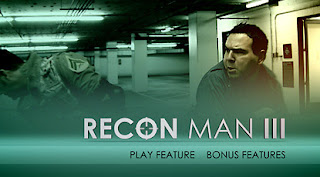 Here's another great tutorial from one of our favorite After Effects tutorial sites, Video Copilot. In this one Andrew Kramer shows you how to use After Effects in conjunction with Adobe Encore to build a looping DVD menu animation and add all the functionality you need to make your DVD's look professional. Watch it here!
Tuesday, August 18, 2009
The After Effects Output Module Exposed
 Here's a comprehensive (if a bit dull) explanation of every one of those pesky settings in the After Effects Output Module, courtesy of Topher Welsh at AE Tuts+. If you've ever struggled with rendering your comps in AE, this one is for you.
The After Effects Output Module Exposed
Friday, July 31, 2009
Great After Effects Resources
 Here are some great resources for you After Effects users!
XScriptorium - After Effects scripts, expressions, presets, and projects
1001 Adobe After Effects Tutorials - compiled by Filmmaker IQ
The After Effects Channel on Adobe TV
Subscribe to:
Posts (Atom)