Check out this behind the scenes look at the making of some of Inception's more memorable action scenes - a true feat of technological innovation in the service of the story!

Showing posts with label technology. Show all posts
Showing posts with label technology. Show all posts
Tuesday, August 9, 2011

Tuesday, February 8, 2011
Brain Farm is Revolutionizing Filmmaking with Technology
Curt Morgan, the director and producer behind Brain Farm Cinema, has pioneered an entirely new style of action-sports filmmaking. Using cutting-edge cameras mounted on trucks, helicopters and snowmobiles, Brain Farm captures intense action without sacrificing scenery.
Originally posted on Motherboard.
Originally posted on Motherboard.
Sunday, October 31, 2010
"The Commuter" - A Short Film Shot Entirely With Nokia N8 Smartphone
From Mashable.com:
What do you think? Does this represent a sea-change in the way digital shorts will be created? Or just another phone company gimmick? Either way, this phone is coming to the U.S. very soon.
Also check out the Nokia N8 page on Vimeo and the Nokia N8 page on YouTube.
The Commuter is a nifty little action-packed film, directed by the McHenry brothers, and starring Dev Patel, Pamela Anderson, Charles Dance and Ed Westwick. Its distinguishing feature, however, is the fact that it was shot entirely with Nokia’s new flagship smartphone, the Nokia N8.
What do you think? Does this represent a sea-change in the way digital shorts will be created? Or just another phone company gimmick? Either way, this phone is coming to the U.S. very soon.
Also check out the Nokia N8 page on Vimeo and the Nokia N8 page on YouTube.
Tuesday, October 26, 2010
Build a Hackintosh

"How to Build a Hackintosh"
Filmmaker and blogger "Koo" of the NoFilmSchool website has documented step-by-step instructions for anyone who wants to build their own Mac clone with better performance, for half the price!
Seems like a no-brainer for the average UAT student!
Thursday, October 14, 2010
DP Shane Hurlburt Explains His HDSLR Shooting Protocol
For all of you venturing into making films using the Canon 5D Mark II or 7D or similar HD-enabled DSLR cameras, this invaluable video comes courtesy of Director of Photography Shane Hurlburt (DP of Terminator Salvation among many other films).
Thursday, April 15, 2010
DV Student Blog: Notes from NAB, Day 2
by Monica Thies
Day 2 at NAB… focus on Post Production...
My dad and I typically stick together at this since he knows so many people and can introduce me (we all know its “who you know” a lot of times…foot in the door..that whole deal). Also, I know that it helps my professionalism level, since everyone knows I look about 16, and when wandering around at a conference this large, I look about 12 (starry eyed and all with the exhibits). Well this morning he had two meetings to attend, and no thank you to sitting in on those, they are about frequency and blah blah blah…snoooore. (Even dad gets bored at them).
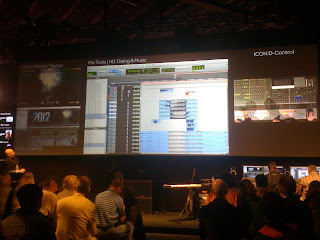 So I decided that while he was away for a few hours I would “hang out” where I’m most comfortable, in the Post Production area (South Hall in case you ever attend). Walking into the Avid booth (where better to start than with our favorite editing software…ha.) they have a Pro Tools DX presentation in progress, the second part of the editing audio/video presentation to show how to effectively utilize the software. Something to always remember if attending a conference is that although they enjoy educating users, most of it is still about marketing their products and showing off what it can do, meaning there are often things they could be leaving out. Such as, leaning into a “mini” presentation given specifically at the “Avid Media Composer” section of the booth, I caught that Avid Media Composer 5 (Nitris DX) is NOT releasing initially in 64-bit version and will release later instead, 3-5 months later. (Big issue for me since the CS5 suite is releasing 64 bit native…) But anyways, at the editing video/audio presentation I walked into, they were using the Pro Tools program to recreate the sound effects from 2012. The Pro Tools was using the Video Satellite integration, meaning you can watch the video as you are doing the sound effects and audio editing. The sound board was the largest sound board I have ever seen, and it has four monitors. The digiboard had to be around my arm span (so 5 feet?) in width. The Avid MC5 integration was beautiful, you could see the timeline through the Video Satellite (and dear gods was that a complex timeline for that movie) and all the video as well as the timeline in Pro Tools with all its editing capabilities for sound.
One of the newest features Avid is priding itself on is at release of Media Composer 5, it will be supporting native RED camera and native QuickTime. (RED camera resolution is incredible by the way… never really noticed until it was on a beautiful LED display). Avid also was demoing Avid DS, the Avid equivalent to After Effects or Combustion/Smoke. As a compositor, I was not a fan of the interface on the program. Like all other Avid products, the interface is more complex and less convenient looking. The work flow view was not easy to follow and I would not instantly recommend this software based on what I saw during a quick demonstration.
Avid had a newer piece of software that I had not seen yet, called Avid Interplay. It is an engine that all clips can be logged, labeled, organized and I’m sure other things that weren’t covered during the “Managing Assets” presentation. As the presenter said, “the main editor doesn’t have the time to log clips and label them” and this way the “assistant editor can log and label clips without having to open Avid Media Composer.” It enables two editors to simultaneously be working and the one working in MC5 has to click “Update bin from Interplay” and the bin is updated based on the work the second editor could have been doing “merely seconds before.” (She was very eloquent with her words). Interplay allows for clips to be automatically sorted based on time code, camera or a few other preset options. Interplay also allows for inter-computer usage and allows for customizable folders, for example, if clips need to be approved before they can be exported, then a “needs approval” folder can be setup and the clip can be highlighted and a drop down changed to “approved” or “denied.” Interplay allows for the clips and media to be exported out of MC5 without actually using MC5, this is helpful for quick exports and reduces the amount of time needed to load software just to do one simple task. Avid MC5 can also be set up for “multi-camera editing” in the source monitor, with a green line around the one which is actively being used in the timeline. The Metadata tools in the MC5 software are the best in the industry, especially for multi-camera editing, and it is easy to see why, since the bins can be organized based on camera groupings. With the multi-camera editing, an editor can easily select a clip, right click, and select a different camera view from the same grouping, just separate angle if needed without having to drop in a separate clip. The clip locator allows you to find the clip within two mouse clicks and find the original bin, and all connected metadata associated with the clip. Very useful when we begin doing multi camera shoots for our program.
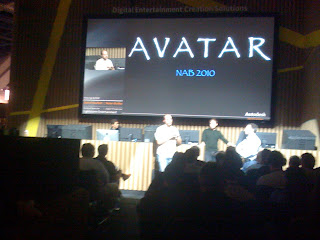 Asset management seemed to be the hot topic of post production of NAB this year, as I heard CNN giving an Adobe CS5 presentation about it, then continued on to Autodesk just in time to catch two of the visual effects supervisors from Avatar (Lightstorm Entertainment, Daniel Neufeldt and Nolan Multha) present about their asset management. I was super excited and completely in shock. It was one of those just stop what I was doing (pretty sure I even almost dropped my phone) and just listen and absorb information (I wish I was better at auditory learning….) They were midway through their presentation but I showed up for the best part. Just in time to hear them say Avatar used around 16,000 processors for rendering. Each FRAME took 60-70 hours (because of R/L eye for stereoscopic 3D), totaling to over 100 million hours of rendering. In total, it was around 2 ½ years of just rendering the movie. Keeping track of each and every plant, leaf of that plant, and every root that was part of that leaf was the hardest part. Hundreds and hundreds of low-res proxies were done as the movie was being filmed so James Cameron could use his “virtual camera.” Avid WAS used to edit Avatar, just in case anyone had any questions still about it really being the industry standard software.
And the best part yet??? They showed us the bonus features from the DVD early. Yeah, I know, it comes out in the next few days, but that still gives me the chance to blog about it real fast before it does release. James Cameron’s opening line of “this is not an animated movie” sort of made me perk up instantly, since, yes I knew it wasn’t animated, but that he was going to show us why it wasn’t and can never be considered that. The actors and actresses had to do EVERYTHING their characters did, so those way badass jumps the Nav'i would do onto their animals, from branches to branches, all of it, was them actually acting. James Cameron had hundreds of extra cameras set up around set just to capture the body movement on the actors to recreate it perfectly. To create the avatars the actors and actresses had to sit in a sphere of lights and have hundreds of pictures taken of their face from every angle possible so that the avatars really were individual to each person. On top of that, while filming, any close up shots would also include a mini camera on a boom attached to a helmet, but the camera was angled at the face, so there were mega-close ups of the facial reactions, once again, for animators to recreate each eye twitch, each slight eye narrowing that the actors did naturally while acting. The set? Except for props, it was pretty much the equivalent of a giant warehouse. The Avatar Mo-cap suits had the hair and ears, most likely for placement, and often times the actors/actresses had to put tiny green dots over their face and lips (I’m guessing for tracking purposes). James Cameron showed us his virtual camera and how he could hold up the camera to any actor on the “set” and be able to see that actor’s avatar and the environment they were in instead of seeing them sitting on a warehouse. All animations and tracking were done in Maya.
Be prepared to watch the Avatar special effects the minute you get the DVD, it truly is amazing what visual effects work was accomplished for this movie. And the best part? It was all done about five years ago, then they had to render.
Day 2 at NAB… focus on Post Production...
My dad and I typically stick together at this since he knows so many people and can introduce me (we all know its “who you know” a lot of times…foot in the door..that whole deal). Also, I know that it helps my professionalism level, since everyone knows I look about 16, and when wandering around at a conference this large, I look about 12 (starry eyed and all with the exhibits). Well this morning he had two meetings to attend, and no thank you to sitting in on those, they are about frequency and blah blah blah…snoooore. (Even dad gets bored at them).
 So I decided that while he was away for a few hours I would “hang out” where I’m most comfortable, in the Post Production area (South Hall in case you ever attend). Walking into the Avid booth (where better to start than with our favorite editing software…ha.) they have a Pro Tools DX presentation in progress, the second part of the editing audio/video presentation to show how to effectively utilize the software. Something to always remember if attending a conference is that although they enjoy educating users, most of it is still about marketing their products and showing off what it can do, meaning there are often things they could be leaving out. Such as, leaning into a “mini” presentation given specifically at the “Avid Media Composer” section of the booth, I caught that Avid Media Composer 5 (Nitris DX) is NOT releasing initially in 64-bit version and will release later instead, 3-5 months later. (Big issue for me since the CS5 suite is releasing 64 bit native…) But anyways, at the editing video/audio presentation I walked into, they were using the Pro Tools program to recreate the sound effects from 2012. The Pro Tools was using the Video Satellite integration, meaning you can watch the video as you are doing the sound effects and audio editing. The sound board was the largest sound board I have ever seen, and it has four monitors. The digiboard had to be around my arm span (so 5 feet?) in width. The Avid MC5 integration was beautiful, you could see the timeline through the Video Satellite (and dear gods was that a complex timeline for that movie) and all the video as well as the timeline in Pro Tools with all its editing capabilities for sound.
One of the newest features Avid is priding itself on is at release of Media Composer 5, it will be supporting native RED camera and native QuickTime. (RED camera resolution is incredible by the way… never really noticed until it was on a beautiful LED display). Avid also was demoing Avid DS, the Avid equivalent to After Effects or Combustion/Smoke. As a compositor, I was not a fan of the interface on the program. Like all other Avid products, the interface is more complex and less convenient looking. The work flow view was not easy to follow and I would not instantly recommend this software based on what I saw during a quick demonstration.
Avid had a newer piece of software that I had not seen yet, called Avid Interplay. It is an engine that all clips can be logged, labeled, organized and I’m sure other things that weren’t covered during the “Managing Assets” presentation. As the presenter said, “the main editor doesn’t have the time to log clips and label them” and this way the “assistant editor can log and label clips without having to open Avid Media Composer.” It enables two editors to simultaneously be working and the one working in MC5 has to click “Update bin from Interplay” and the bin is updated based on the work the second editor could have been doing “merely seconds before.” (She was very eloquent with her words). Interplay allows for clips to be automatically sorted based on time code, camera or a few other preset options. Interplay also allows for inter-computer usage and allows for customizable folders, for example, if clips need to be approved before they can be exported, then a “needs approval” folder can be setup and the clip can be highlighted and a drop down changed to “approved” or “denied.” Interplay allows for the clips and media to be exported out of MC5 without actually using MC5, this is helpful for quick exports and reduces the amount of time needed to load software just to do one simple task. Avid MC5 can also be set up for “multi-camera editing” in the source monitor, with a green line around the one which is actively being used in the timeline. The Metadata tools in the MC5 software are the best in the industry, especially for multi-camera editing, and it is easy to see why, since the bins can be organized based on camera groupings. With the multi-camera editing, an editor can easily select a clip, right click, and select a different camera view from the same grouping, just separate angle if needed without having to drop in a separate clip. The clip locator allows you to find the clip within two mouse clicks and find the original bin, and all connected metadata associated with the clip. Very useful when we begin doing multi camera shoots for our program.
 Asset management seemed to be the hot topic of post production of NAB this year, as I heard CNN giving an Adobe CS5 presentation about it, then continued on to Autodesk just in time to catch two of the visual effects supervisors from Avatar (Lightstorm Entertainment, Daniel Neufeldt and Nolan Multha) present about their asset management. I was super excited and completely in shock. It was one of those just stop what I was doing (pretty sure I even almost dropped my phone) and just listen and absorb information (I wish I was better at auditory learning….) They were midway through their presentation but I showed up for the best part. Just in time to hear them say Avatar used around 16,000 processors for rendering. Each FRAME took 60-70 hours (because of R/L eye for stereoscopic 3D), totaling to over 100 million hours of rendering. In total, it was around 2 ½ years of just rendering the movie. Keeping track of each and every plant, leaf of that plant, and every root that was part of that leaf was the hardest part. Hundreds and hundreds of low-res proxies were done as the movie was being filmed so James Cameron could use his “virtual camera.” Avid WAS used to edit Avatar, just in case anyone had any questions still about it really being the industry standard software.
And the best part yet??? They showed us the bonus features from the DVD early. Yeah, I know, it comes out in the next few days, but that still gives me the chance to blog about it real fast before it does release. James Cameron’s opening line of “this is not an animated movie” sort of made me perk up instantly, since, yes I knew it wasn’t animated, but that he was going to show us why it wasn’t and can never be considered that. The actors and actresses had to do EVERYTHING their characters did, so those way badass jumps the Nav'i would do onto their animals, from branches to branches, all of it, was them actually acting. James Cameron had hundreds of extra cameras set up around set just to capture the body movement on the actors to recreate it perfectly. To create the avatars the actors and actresses had to sit in a sphere of lights and have hundreds of pictures taken of their face from every angle possible so that the avatars really were individual to each person. On top of that, while filming, any close up shots would also include a mini camera on a boom attached to a helmet, but the camera was angled at the face, so there were mega-close ups of the facial reactions, once again, for animators to recreate each eye twitch, each slight eye narrowing that the actors did naturally while acting. The set? Except for props, it was pretty much the equivalent of a giant warehouse. The Avatar Mo-cap suits had the hair and ears, most likely for placement, and often times the actors/actresses had to put tiny green dots over their face and lips (I’m guessing for tracking purposes). James Cameron showed us his virtual camera and how he could hold up the camera to any actor on the “set” and be able to see that actor’s avatar and the environment they were in instead of seeing them sitting on a warehouse. All animations and tracking were done in Maya.
Be prepared to watch the Avatar special effects the minute you get the DVD, it truly is amazing what visual effects work was accomplished for this movie. And the best part? It was all done about five years ago, then they had to render.
Tuesday, April 13, 2010
DV Student Blog: Notes from NAB, Day 1
by Monica Thies
Ahh…NAB Show Day #1…so much to talk about…
First, NAB stands for National Association of Broadcasters, the “show” part meaning it is the largest convention the association puts on and includes every gadget, gizmo, software, hardware, bells and whistles ever needed for radio or television production in any phase. Although typically marketed towards news and broadcasting, a lot of the technology seen is intuition to where film is taking us as a society and how we’re getting there. This is my third year at this show, and by now I have established “regular stops.” Today was my day out on the floor, and I managed to hit up “The Big A’s” (Adobe, Autodesk and Avid) along with the ever-favorite Sony, Panasonic and Canon. I’ll discuss a little bit about what is going on with each of these further along in this post. Reading carefully “between the lines” of the broadcast market, the other software and hardware that is more commonly used at our school can be seen.
 Each year, there is always a “big push” or “fad” that every vendor, every company and every person through the company is promoting so heavily its beyond obvious. Last year was High Def and the big switch over to HD alongside with the beginnings of 3D technology. This year, I walked into the convention center and the first thing I see is the giant Evertz booth (a broadcasting company that does mostly routing and audio for news broadcasting) with the slogan of “Real 3D solutions.” 3D is the "it" thing this year. The booth next to it, Miranda (similar to Evertz) was heavily pushing 3D as well, and how they are developing a way to have a “stereoscopic signal” in order to broadcast 3D (hmm... 3D news soon?) Both Evertz and Miranda had 3D cameras on display, a rig created out of two different cameras one horizontal in the normal position, the other, vertical pointing downwards, perpendicular with the first camera, wired together, one big lens added on and thrown on a tripod. I found this absolutely fascinating until I wandered (with Paul’s advice) over towards the Panasonic booth (shall I say area? They took up a lot of space).
At the Panasonic area, they had not just a stereoscopic 3D camera, but it was a twin lens 3D camera to create real 3D without needing to point one camera down and one camera in a normal direction. It was a 3D camera that was about as portable as the cameras at school. This was the Panasonic AG-3DA1 camera. The 3D coming out of the camera was phenomenal. It will be the camera that pushes us into the pro-sumer level of 3D movies.
Over at Canon, they had an interesting new handheld camera at a pro-sumer level. Smaller than our resident XL-H1’s and XL-2 camera’s but just as powerful, if not more powerful. It is the Canon XF-305. It is a “better than HD” resolution camera with compact flash storage. It can hold multiple CF cards, and when one is full, will flip seamlessly to the other CF storage card without skipping a frame (very convenient for those long shoots). My favorite part was the LCD viewing screen onboard the camera, it was flipped inside the handle for portability, and had wonderful resolution, as well as being able to flip out on both the left and right side of the camera.
 We practically ran into Sony, in fact, you couldn’t miss it. Sony takes up its own region in the conference central hall (by the way, Vegas has one of the biggest conference centers in the nation, so taking up its own region is pretty big) Sony was a complete playground. With a good half of it devoted to awing people with a massive, absolutely massive, 3D LED TV. No surprise that they had a 3D LED TV, but I will say this for it, it is incredible. They played pieces of a football game, and it was the same as standing on the field next to my dad at a Seahawks game. It was exactly like being right there. They played an underwater in Hawaii series of clips, it was just like diving off the beach of Maui all over again. The glasses we were given to use were the basic Real 3D glasses, and I decided they are not that bulky at all. Rather they are light weight and do not affect your vision when not looking at a 3D screen. If I have to walk around in glasses like that for the rest of my life in order to continually watch football as though I’m standing on the sideline, it may be worth the fashion no-no.
 While over at the Sony booth (playground) there was a 3D truck, a mobile broadcasting truck to be able to broadcast in 3D, didn’t make it in though, there was a long line of men from Japan anxious to see. Of course, there was the Sony Vegas area (skipped that, not worth my time) and the camera booths showing the camera quality. There were two 3D cameras that Sony was promoting, neither a twin lens one such as the Panasonic camera. This I was surprised about. I would think that a company who is so heavily promoting their new 3D LED television would have a camera that is as high tech as the television itself. Not that having two cameras perpendicular isn’t high tech, obviously more than I came up with, just surprised they did not have the twin lens camera at least in development as competitor Panasonic does.
Sony had multiple designs of their display monitors up. It amazes me how cheap LCD monitors now are; yet our school still relies on CRT monitors. The LCD ones are nice and lightweight, and even relatively low cost now. The LCD monitors can show us more clarity when shooting HD video. It is also interesting to me how analog anything is practically illegal to mention at NAB, everything is digital. Even broadcasting frequency spectrum has gone 100% digital and the numbers lowered to adapt to our Digital Age.
 And finally…the Triple A’s. The big dogs of what we do in our Digital Video Program at school. The guru’s who make the software so we can make it happen. The…okay enough raging about how “A”-mazing (ha.ha.ha …not.) are. Let us start with Avid. Avid is up to Media Composer 5, I did not, however, manage to make it to a presentation today on the Avid editing software, though did see the interface being quite pretty. They have released new Mojo boxes and Digiboards to run with the Media Composer Software (all locked up in a nice case so I couldn’t examine either). The entire series is referred to as “Avid Nitrix DX” I will be curious to see tomorrow what has changed about it all. I can already guess it is a 64 bit native software and pro tools has seamless integration (make a change in Pro Tools, makes the change in Avid without extra hoops to jump through).
 Autodesk. Surprisingly, they were not focusing on just Lustre (color correction) as normal. They were focusing on the usability and how to use, Smoke (Autodesk’s version of After Effects…the new Combustion). On a Mac. Very specifically. On a Mac. My favorite feature after watching part of a demonstration on Smoke was the flow chart organization. It is similar to the old Combustion flowchart setup, but I feel as though this one was easier to understand than when I learned Combustion. The keying features were nice, but then again they had a lot of the effects preset so he could easily demonstrate what the software can do. (Of course maybe they come preset in the software too…)
 The other demonstration going on at the time was about 3DS Max 2011. Now I’m not a big 3DS Max user, in fact I have used it very minimally and not to much success. The feature he was really showing off though was the ability to texture right within Max, and how you could begin a texture wrap in Max, export and link the file to Photoshop, continue it in Photoshop and it would make the change right there in the Max texture wrap as well, and instantly apply it to the model. (Just a side note to everyone, ALL and I mean ALL design users, from Autodesk and Adobe were using tablets only, nothing else. They were incredible with the tablets too, and when asked one said he is “faster with a tablet than with a mouse and keyboard anyways”).
 Annnnd finally…Adobe. With the release of their Creative Suite 5 today, (and if you bought it on the floor today you were eligible to win an Nvidia Quadro FX 4800 and a free gift with purchase…OoOo). The CS5 Suite is native 64 bit design. This is supposedly one of the biggest changes made to the software. Adobe claims that this will make “HD just as fast as SD”. Adobe has made collaborating between multiple software’s easier. Not just between Adobe software’s (that was always easy) but collaborating footage and images between Avid, Final Cut Pro and of course, Premier Pro. Adobe has partnered with CNN to create an easier to use workspace for “journalism” and “news editing”. Meaning for us moviemakers that the interface will be very easy to use (if it wasn’t already before….) In CS5, they have decoupled the rendering capabilities, meaning a project can be created on one machine, but sent to another to render instead. This would be extremely useful for us if we wanted to set render queues up on 2-4 reliable machines and not use the entire DV Lab plus three classrooms hoping ten machines will actually finish renders and not crash halfway through. CS5 looks to be a good upgrade but not necessary if 64 Bit systems are not being used.
Blackberries, iPhones, Androids, Oh NO!!! Smartphones smartphones smartphones! They are everywhere! Everyone is on one all the time! It is actually incredible the amount of people who are on a smart phone. Streambox, a media encoding/decoding to help stream mobile media, even now has an iPhone app to stream video back to the “station” and provide on the go footage for news stories. Next up, live shots from the phone, you don’t even need a camera anymore!
And last but not least....one of the vendors, Harris, had this sign above their booth…I thought it was amusing due to the wording, which includes one of our school’s absolute favorite words…

Ahh…NAB Show Day #1…so much to talk about…
First, NAB stands for National Association of Broadcasters, the “show” part meaning it is the largest convention the association puts on and includes every gadget, gizmo, software, hardware, bells and whistles ever needed for radio or television production in any phase. Although typically marketed towards news and broadcasting, a lot of the technology seen is intuition to where film is taking us as a society and how we’re getting there. This is my third year at this show, and by now I have established “regular stops.” Today was my day out on the floor, and I managed to hit up “The Big A’s” (Adobe, Autodesk and Avid) along with the ever-favorite Sony, Panasonic and Canon. I’ll discuss a little bit about what is going on with each of these further along in this post. Reading carefully “between the lines” of the broadcast market, the other software and hardware that is more commonly used at our school can be seen.
 Each year, there is always a “big push” or “fad” that every vendor, every company and every person through the company is promoting so heavily its beyond obvious. Last year was High Def and the big switch over to HD alongside with the beginnings of 3D technology. This year, I walked into the convention center and the first thing I see is the giant Evertz booth (a broadcasting company that does mostly routing and audio for news broadcasting) with the slogan of “Real 3D solutions.” 3D is the "it" thing this year. The booth next to it, Miranda (similar to Evertz) was heavily pushing 3D as well, and how they are developing a way to have a “stereoscopic signal” in order to broadcast 3D (hmm... 3D news soon?) Both Evertz and Miranda had 3D cameras on display, a rig created out of two different cameras one horizontal in the normal position, the other, vertical pointing downwards, perpendicular with the first camera, wired together, one big lens added on and thrown on a tripod. I found this absolutely fascinating until I wandered (with Paul’s advice) over towards the Panasonic booth (shall I say area? They took up a lot of space).
At the Panasonic area, they had not just a stereoscopic 3D camera, but it was a twin lens 3D camera to create real 3D without needing to point one camera down and one camera in a normal direction. It was a 3D camera that was about as portable as the cameras at school. This was the Panasonic AG-3DA1 camera. The 3D coming out of the camera was phenomenal. It will be the camera that pushes us into the pro-sumer level of 3D movies.
Over at Canon, they had an interesting new handheld camera at a pro-sumer level. Smaller than our resident XL-H1’s and XL-2 camera’s but just as powerful, if not more powerful. It is the Canon XF-305. It is a “better than HD” resolution camera with compact flash storage. It can hold multiple CF cards, and when one is full, will flip seamlessly to the other CF storage card without skipping a frame (very convenient for those long shoots). My favorite part was the LCD viewing screen onboard the camera, it was flipped inside the handle for portability, and had wonderful resolution, as well as being able to flip out on both the left and right side of the camera.
 We practically ran into Sony, in fact, you couldn’t miss it. Sony takes up its own region in the conference central hall (by the way, Vegas has one of the biggest conference centers in the nation, so taking up its own region is pretty big) Sony was a complete playground. With a good half of it devoted to awing people with a massive, absolutely massive, 3D LED TV. No surprise that they had a 3D LED TV, but I will say this for it, it is incredible. They played pieces of a football game, and it was the same as standing on the field next to my dad at a Seahawks game. It was exactly like being right there. They played an underwater in Hawaii series of clips, it was just like diving off the beach of Maui all over again. The glasses we were given to use were the basic Real 3D glasses, and I decided they are not that bulky at all. Rather they are light weight and do not affect your vision when not looking at a 3D screen. If I have to walk around in glasses like that for the rest of my life in order to continually watch football as though I’m standing on the sideline, it may be worth the fashion no-no.
 While over at the Sony booth (playground) there was a 3D truck, a mobile broadcasting truck to be able to broadcast in 3D, didn’t make it in though, there was a long line of men from Japan anxious to see. Of course, there was the Sony Vegas area (skipped that, not worth my time) and the camera booths showing the camera quality. There were two 3D cameras that Sony was promoting, neither a twin lens one such as the Panasonic camera. This I was surprised about. I would think that a company who is so heavily promoting their new 3D LED television would have a camera that is as high tech as the television itself. Not that having two cameras perpendicular isn’t high tech, obviously more than I came up with, just surprised they did not have the twin lens camera at least in development as competitor Panasonic does.
Sony had multiple designs of their display monitors up. It amazes me how cheap LCD monitors now are; yet our school still relies on CRT monitors. The LCD ones are nice and lightweight, and even relatively low cost now. The LCD monitors can show us more clarity when shooting HD video. It is also interesting to me how analog anything is practically illegal to mention at NAB, everything is digital. Even broadcasting frequency spectrum has gone 100% digital and the numbers lowered to adapt to our Digital Age.
 And finally…the Triple A’s. The big dogs of what we do in our Digital Video Program at school. The guru’s who make the software so we can make it happen. The…okay enough raging about how “A”-mazing (ha.ha.ha …not.) are. Let us start with Avid. Avid is up to Media Composer 5, I did not, however, manage to make it to a presentation today on the Avid editing software, though did see the interface being quite pretty. They have released new Mojo boxes and Digiboards to run with the Media Composer Software (all locked up in a nice case so I couldn’t examine either). The entire series is referred to as “Avid Nitrix DX” I will be curious to see tomorrow what has changed about it all. I can already guess it is a 64 bit native software and pro tools has seamless integration (make a change in Pro Tools, makes the change in Avid without extra hoops to jump through).
 Autodesk. Surprisingly, they were not focusing on just Lustre (color correction) as normal. They were focusing on the usability and how to use, Smoke (Autodesk’s version of After Effects…the new Combustion). On a Mac. Very specifically. On a Mac. My favorite feature after watching part of a demonstration on Smoke was the flow chart organization. It is similar to the old Combustion flowchart setup, but I feel as though this one was easier to understand than when I learned Combustion. The keying features were nice, but then again they had a lot of the effects preset so he could easily demonstrate what the software can do. (Of course maybe they come preset in the software too…)
 The other demonstration going on at the time was about 3DS Max 2011. Now I’m not a big 3DS Max user, in fact I have used it very minimally and not to much success. The feature he was really showing off though was the ability to texture right within Max, and how you could begin a texture wrap in Max, export and link the file to Photoshop, continue it in Photoshop and it would make the change right there in the Max texture wrap as well, and instantly apply it to the model. (Just a side note to everyone, ALL and I mean ALL design users, from Autodesk and Adobe were using tablets only, nothing else. They were incredible with the tablets too, and when asked one said he is “faster with a tablet than with a mouse and keyboard anyways”).
 Annnnd finally…Adobe. With the release of their Creative Suite 5 today, (and if you bought it on the floor today you were eligible to win an Nvidia Quadro FX 4800 and a free gift with purchase…OoOo). The CS5 Suite is native 64 bit design. This is supposedly one of the biggest changes made to the software. Adobe claims that this will make “HD just as fast as SD”. Adobe has made collaborating between multiple software’s easier. Not just between Adobe software’s (that was always easy) but collaborating footage and images between Avid, Final Cut Pro and of course, Premier Pro. Adobe has partnered with CNN to create an easier to use workspace for “journalism” and “news editing”. Meaning for us moviemakers that the interface will be very easy to use (if it wasn’t already before….) In CS5, they have decoupled the rendering capabilities, meaning a project can be created on one machine, but sent to another to render instead. This would be extremely useful for us if we wanted to set render queues up on 2-4 reliable machines and not use the entire DV Lab plus three classrooms hoping ten machines will actually finish renders and not crash halfway through. CS5 looks to be a good upgrade but not necessary if 64 Bit systems are not being used.
Blackberries, iPhones, Androids, Oh NO!!! Smartphones smartphones smartphones! They are everywhere! Everyone is on one all the time! It is actually incredible the amount of people who are on a smart phone. Streambox, a media encoding/decoding to help stream mobile media, even now has an iPhone app to stream video back to the “station” and provide on the go footage for news stories. Next up, live shots from the phone, you don’t even need a camera anymore!
And last but not least....one of the vendors, Harris, had this sign above their booth…I thought it was amusing due to the wording, which includes one of our school’s absolute favorite words…

Tuesday, September 22, 2009
Final Cut Pro or Avid Media Composer?
 Here's an interesting perspective on the age-old Avid vs. FCP debate, from Guardian Studios, an Avid-equipped production and post house in Columbus, OH. Naturally each system has its pros and cons, its supporters and detractors.
For students figuring out which system to learn and why, this blog post is definitely worth a read - and so are the comments!
Monday, September 21, 2009
Everything is About to Change: Arri's New Digital Camera System
 Arri has released early specs for its new family of digital cinema cameras, featuring 35mm-sized sensors and light sensitivity equivalent to 800 ISO filmstock. Coupled with the ability to use a vast array of cinema prime lenses, high-resolution electronic viewfinders, or traditional optical viewfinders, these new cameras reflect Arri's longtime commitment to providing filmmakers with the tools they really want.
Arri has also provided a searchable, indexed HTML version of Quantel's "Digital Fact Book" - an incredibly inclusive glossary and reference guide to digital video technology. The Digital Fact Book is also available as a PDF.
Monday, August 31, 2009
RED ROCKET - Now That's FAST!
Check out this video of the RED ROCKET in action as it transcodes 20 seconds worth of 4k frames in just 19 seconds! (In other words, faster than real time.)
The ROCKET is RED's new accelerator board for decoding, transcoding, de-Bayering and playback of files shot with the RED ONE camera. What is "de-Bayering?" I'm glad you asked!
The simple explanation is that digital video camcorders and digital cinema cameras such as the RED ONE employ a Bayer filter to optimize image capture and compression and emulate the way the human eye perceives chrominance and luminance. The result is that images shot using this filtering process end up with twice as many green pixels as blue or red pixels, and a "de-Bayer" process is required to ensure proper color balance on playback. What's noteworthy about the RED ROCKET is that it does all of that (and more) at breakneck speeds, for not a lot of money. This bodes well for 4K-capable desktop editing machines at even high performance benchmarks with lower costs in the near future.
Red Rocket from Ted Schilowitz on Vimeo.
The ROCKET is RED's new accelerator board for decoding, transcoding, de-Bayering and playback of files shot with the RED ONE camera. What is "de-Bayering?" I'm glad you asked!
The simple explanation is that digital video camcorders and digital cinema cameras such as the RED ONE employ a Bayer filter to optimize image capture and compression and emulate the way the human eye perceives chrominance and luminance. The result is that images shot using this filtering process end up with twice as many green pixels as blue or red pixels, and a "de-Bayer" process is required to ensure proper color balance on playback. What's noteworthy about the RED ROCKET is that it does all of that (and more) at breakneck speeds, for not a lot of money. This bodes well for 4K-capable desktop editing machines at even high performance benchmarks with lower costs in the near future.
Thursday, August 20, 2009
Innovation: Video Ads in Magazines
From CNET:
Read the full article, or watch video-ad manufacturer Americhip's video on YouTube:
This technology represents the start of what will surely be a future filled with digital video applications of all shapes and sizes.
Broadcast network CBS will be advertising its fall TV season with a video-chip ad embedded in an issue of Entertainment Weekly.
The September 18 issue of the Time Inc.-owned magazine will feature the first video ad to appear in print, George Schweitzer, CBS marketing president, said Wednesday at a press conference at the company's headquarters here.
Read the full article, or watch video-ad manufacturer Americhip's video on YouTube:
This technology represents the start of what will surely be a future filled with digital video applications of all shapes and sizes.
Monday, August 17, 2009
Red One, Canon 5D Mk II, and Panasonic Lumix GH1 Footage Comparison
Here's an amazing bit of footage posted by premiere Hollywood equipment rental house Birns and Sawyer on their Vimeo channel.
What's so amazing about it? It compares side-by-side-by side the output of three hype-worthy cameras - the 4k-capable digital cinema RED ONE camera (roughly $20k) and two DSLRs equipped with "movie" modes, the $3500 Canon 5D Mark II and the $2200 Panasonic Lumix GH1. This is the first time I've seen footage from the Panasonic, and the first time I have seen anyone cut together material from a RED with footage from a DSLR. What it shows is that the technology has definitely shifted and this new generation of DSLRs are game-changers in terms of comparing price to image quality.
Red One, Canon 5D Mk II, and Panasonic Lumix GH1 Footage Comparison from Birns and Sawyer on Vimeo.
What's so amazing about it? It compares side-by-side-by side the output of three hype-worthy cameras - the 4k-capable digital cinema RED ONE camera (roughly $20k) and two DSLRs equipped with "movie" modes, the $3500 Canon 5D Mark II and the $2200 Panasonic Lumix GH1. This is the first time I've seen footage from the Panasonic, and the first time I have seen anyone cut together material from a RED with footage from a DSLR. What it shows is that the technology has definitely shifted and this new generation of DSLRs are game-changers in terms of comparing price to image quality.
Friday, July 3, 2009
Variety: ACE honors Avid's Media Composer
From Variety:
"In an announcement that combines kudos to one company, a jab at another and a warning flare for producers, the American Cinema Editors board of directors is honoring Avid's Media Composer software with the org's first-ever ACE Technical Excellence Award."Read the rest here:
Monday, June 22, 2009
From CNET: 3D means new rules for directors
 CNET's Rafe Needleman has posted an insightful blog post about 3D stereoscopic imaging and its impact on current and future entertainment trends in film, TV, and videogames. Like it or not, it seems 3D is here to stay for the immediate future and will continue to be a growth area in both content creation and emerging technologies.
3D is still seen as gimmick by most consumers, but it's becoming more mainstream. That means content producers and artists will be thinking about 3D content more in the near future: Not just how to have it call attention to itself, but rather how to have 3D fade, as it were, into the background of the storytelling.Read the rest here.
Saturday, June 6, 2009
Editors talk Avid, Apple, Adobe
From StudioDaily: At the AlphaDogs Editors' Lounge, a panel of editors discuss the battle for the NLE market, including the future of Avid, whether Apple is committed to its ProApps and how Adobe may just sneak up and overtake them both in coming years.
Thursday, June 4, 2009
Editors' Picks at NAB
From StudioDaily: At the AlphaDogs Editors' Lounge, a panel of editors talk about NAB 09, how the reduced attendance made if the best show in years and what products impressed them.
Saturday, May 30, 2009
Stereoscopic 3D: Fad or Not?
From StudioDaily: Editors debate whether stereoscopic 3D is here to stay or if it will soon disappear just like it has in the past. Hear reasons why 3D may be different this time around and why some don't buy any of it.
Thursday, April 23, 2009
This is why we teach Avid...
Avid has posted their new demo reel for 2009, highlighting their entire product line, their new logo, and footage from some of their biggest and most visible customers. Check it out here!
Monday, April 13, 2009
This is why you shouldn't be texting in class
From TED.org: In this funny (and actually poignant) 3-minute talk, social strategist Renny Gleeson breaks down our always-on social world -- where the experience we're having right now is less interesting than what we'll tweet about it later.
Wednesday, March 25, 2009
Innovation: Slumdog Millionaire's unique Silicon Imaging 2K camera rigs
 Silicon Imaging, a leader in digital imaging and one of the companies on the forefront of the digital cinema revolution, has issued a press release detailing the unique SI-2K Digital Cinema Camera rigs created for Best Picture winner Slumdog Millionaire.
A customized camera support and recording package had to be built to meet the unique form factor demands of the Slumdog shoot. They enlisted Pille Film, of Wiesbaden Germany, to create a custom solution which included a gyro stabilizer for the base of the SI-2K Mini. Instead of using the traditional film-style camera body, they elected to use Apple Mac book Pro notebook, running Windows XP, for the recorders, and built them into ruggedized backpacks, to be worn inconspicuously. Stefan Ciupek, the show’s technical supervisor and additional camera operator, coordinated the design and modifications of the camera system with Wolfgang Damm of Pille, whose team worked around the clock to get the 2K Mini rigs built.Read the complete press release here.
Subscribe to:
Posts (Atom)